JaKooLit/Hyprland-Dots
ShellHyprland configuration files or dotfiles - This repo is used as main repo for all my Distro-Hyprland Install Scripts. See the readme


IMPORTANT! Beginning of March 2026, This project will be archived and it will be maintained by Dwilliams





 KooL's Hyprland Dotfiles Showcase
📹 A video walkthroughs
- at the bottom
🚩 🏁 Auto Distro-Hyprland install scripts cloning and starting 🇵🇭
[!CAUTION] If you are using FISH SHELL, DO NOT use this function. Clone the Distro-Hyprland and ran install.sh instead
- NOTE: you need package
curlfor this to work
sh <(curl -L https://raw.githubusercontent.com/JaKooLit/Hyprland-Dots/main/Distro-Hyprland.sh)
- You can use the above command to automatically clone the
Distro-Hyprlandinstall scripts - It will clone the install script and start the
install.sh😎
👁️🗨️ My Hyprland install Scripts 👁️🗨️
Automated Hyprland Scripts for Distro of choice which will pull this dotfiles if opted to install these configurations
🪧 Attention 🪧
- This repo does NOT contain or will NOT install any packages. These are only pre-configured-hyprland configs or dotfiles
- refer to install scripts what packages needed to install... but at least, Hyprland packages are required
- This repo will be pulled by the Distro-Hyprland install scripts above if you opt to download pre-configured dots
👀 Screenshots 👀
- All screenshots are collected here Screenshots
📦 Whats new?
- To easily track changes, I will be updating the CHANGELOGS Screenshots will be included if worth mentioning the changes!
[!NOTE] Kindly note that by default, Kools Dots are adjusted / configured for 2k (1440p) display without scaling.
💥 Copying / Installation / Update instructions 💥
-
[!Note] The auto copy script
copy.shwill create backups of intended directories to be copied. However, it's still a good idea to manually backup just incase script fails to backup your configuration. If you already have a hyprland configuration, uninstall it first, or create a new user, and install it with that user Clone this repo by using
git.Change directory, i.e.
cd Arch-HyprlandMake
install.shexecutablechmod +x ./install.shRun the script
./install.sh
To download from Master branch Note: Ubuntu is exception, it has version specific branches
git clone --depth=1 https://github.com/JaKooLit/Hyprland-Dots.git
cd Hyprland-Dots
to download from Development branch (development and testing) Not recommeded for non-testing systems
git clone --depth=1 https://github.com/JaKooLit/Hyprland-Dots.git -b development
cd Hyprland-Dots
- automatic copy/install of pre-configured dots (recommended for updating)
chmod +x copy.sh
./copy.sh
- to copy/install from releases (stable) (note this is 1 version older than in main)
chmod +x release.sh
./release.sh
- UPGRADE.sh function
[!IMPORTANT] You need rsync for it to work you should have already up and running KooL's Hyprland before using this function
chmod +x upgrade.sh
./upgrade.sh
❗❗❗ DEBIAN AND UBUNTU!
Debian 13
- Now builds Hyprland 0.51.1 from source using the
install.shscript - So the current version of Hyprland-Dots is compatible only in those cases.
- Now builds Hyprland 0.51.1 from source using the
Ubuntu 24.04/25.10
- We are now using a PPA to get more current versions of Hyprland.
- So the current version of these Dotfiles are compatible if you updated to the PPA based configuration.
⚠️⚠️⚠️ ATTENTION - BACKUPS CREATED by SCRIPT
[!CAUTION]
copy.sh,release.shand evenupgrade.shcreates a backup! Kindly investigate manually contents on your$HOME/.configDelete manually any backups which you dont want.
🛎️ a small note on wallpapers
- by default, only few wallpapers will be copied (1 each dark and light plus 3 more). You will be offered to download more wallpapers. You can preview/check the additional wallpapers from
THISLink
⚠️⚠️⚠️ A MUST! after copying / Installing these dots
Press
SUPER Wand set a wallpaper. This is also to initiate wallust for waybar, kitty (tty) and rofi themes.However, If you use the
copy.shor therelease.sh, there will be a preset initial Wallpaper and you dont have to do thisNvidia Owners. Make sure to edit your
~/.config/hypr/UserConfigs/ENVariables.conf(highly recommended).
- NVIDIA users / owners, after installation, check
THIS
- If you have already set your own keybinds, monitors, etc.... Just copy over from backup created before log-out or reboot. (recommended)
📖 Known issues and possible solutions
- check out this page FAQ and UNSOLVED ISSUES
🙋 QUESTIONS ?!?! ⁉️
- FAQ! Yes you can use these dotfiles to other distro! Just ensure to install proper packages first! If it makes you feel better, I use same config on my Gentoo:)
- QUICK HINT! Click the HINT! Waybar module (note only available in Waybar default and Simple-L [TOP] layout). Can be launched by Keybind
SUPER H - More question? click here browse through this WIKI
- If you want the old configs, it is collected on my "Archive" repo. See HERE
⌨ Keybinds
- Keybinds
CLICK
🙏 Special request
- If you have improvements on the dotfiles or configuration, feel free to submit a PR for improvement.
- I always welcome improvements as I am also just learning just like you guys!
✍️ Contributing
- Want to contribute? Click
HEREfor a guide how to contribute
Thanks to all who have contributed code, or support on the Discord server. You efforts are greatly appreciated
🤷♂️ TO DO!
- Tweak dots - 🚧 in constant progress
🔮 Discord Server
- kindly join my Discord
💖 Support
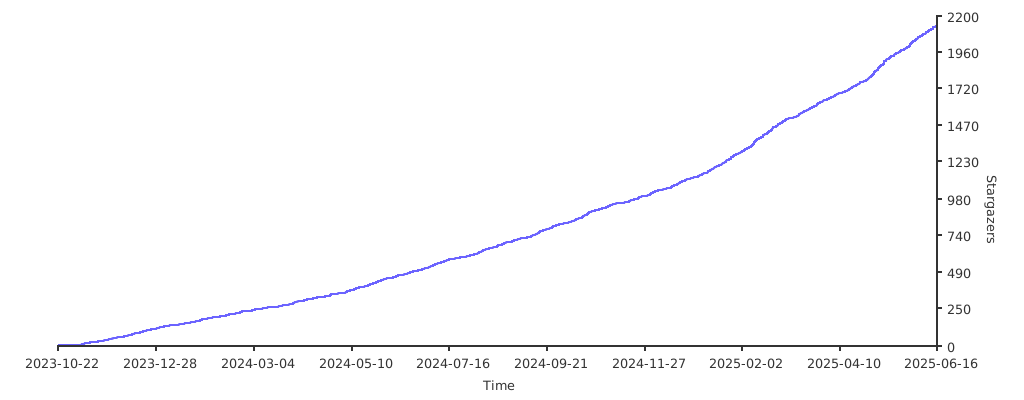
a Star on my Github repos would be nice 🌟
Subscribe to my Youtube Channel YouTube
you can also give support through coffee's or btc 😊

or

Or you can donate cryto on my btc wallet :)
1N3MeV2dsX6gQB42HXU6MF2hAix1mqjo8i
🫰 Thank you for the stars 🩷