Back to rankings
dogo/SCLAlertView
Objective-CBeautiful animated Alert View. Written in Objective-C
objective-csclalertview-objectivecocoapodscarthagealertalertviewiosuialertcontroller
Key Metrics
Star Growth
Stars
3.5k
Forks
518
Weekly Growth
—
Issues
0
1k2k3k
Sep 2014Aug 2016Aug 2018Aug 2020Aug 2022Jul 2024Jul 2026
README
SCLAlertView-Objective-C
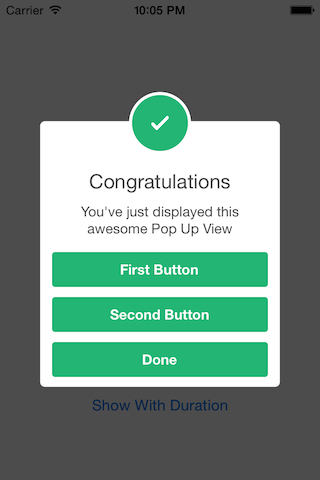
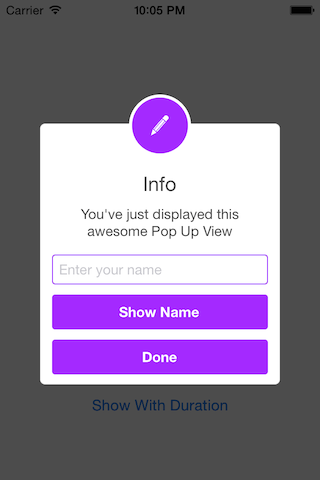
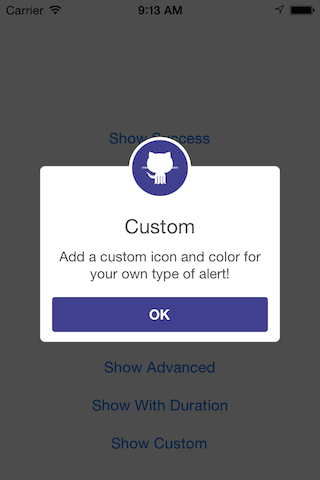
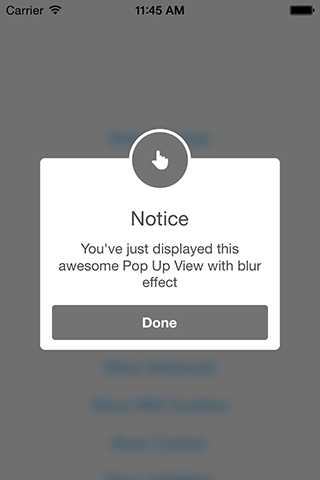
Animated Alert View written in Swift but ported to Objective-C, which can be used as a UIAlertView or UIAlertController replacement.




 _
_
 _
_
 _
_
Fluent style
SCLAlertViewBuilder *builder = [SCLAlertViewBuilder new]
.addButtonWithActionBlock(@"Send", ^{ /*work here*/ });
SCLAlertViewShowBuilder *showBuilder = [SCLAlertViewShowBuilder new]
.style(SCLAlertViewStyleWarning)
.title(@"Title")
.subTitle(@"Subtitle")
.duration(0);
[showBuilder showAlertView:builder.alertView onViewController:self.window.rootViewController];
// or even
showBuilder.show(builder.alertView, self.window.rootViewController);
Complex
    NSString *title = @"Title";
    NSString *message = @"Message";
    NSString *cancel = @"Cancel";
    NSString *done = @"Done";

    SCLALertViewTextFieldBuilder *textField = [SCLALertViewTextFieldBuilder new].title(@"Code");
    SCLALertViewButtonBuilder *doneButton = [SCLALertViewButtonBuilder new].title(done)
    .validationBlock(^BOOL{
        NSString *code = [textField.textField.text copy];
        return [code isVisible];
    })
    .actionBlock(^{
        NSString *code = [textField.textField.text copy];
        [self confirmPhoneNumberWithCode:code];
    });

    SCLAlertViewBuilder *builder = [SCLAlertViewBuilder new]
    .showAnimationType(SCLAlertViewShowAnimationFadeIn)
    .hideAnimationType(SCLAlertViewHideAnimationFadeOut)
    .shouldDismissOnTapOutside(NO)
    .addTextFieldWithBuilder(textField)
    .addButtonWithBuilder(doneButton);

    SCLAlertViewShowBuilder *showBuilder = [SCLAlertViewShowBuilder new]
    .style(SCLAlertViewStyleCustom)
    .image([SCLAlertViewStyleKit imageOfInfo])
    .color([UIColor blueColor])
    .title(title)
    .subTitle(message)
    .closeButtonTitle(cancel)
    .duration(0.0f);

    [showBuilder showAlertView:builder.alertView onViewController:self];
Easy to use
// Get started
SCLAlertView *alert = [[SCLAlertView alloc] init];

[alert showSuccess:self title:@"Hello World" subTitle:@"This is a more descriptive text." closeButtonTitle:@"Done" duration:0.0f];

// Alternative alert types
[alert showError:self title:@"Hello Error" subTitle:@"This is a more descriptive error text." closeButtonTitle:@"OK" duration:0.0f]; // Error
[alert showNotice:self title:@"Hello Notice" subTitle:@"This is a more descriptive notice text." closeButtonTitle:@"Done" duration:0.0f]; // Notice
[alert showWarning:self title:@"Hello Warning" subTitle:@"This is a more descriptive warning text." closeButtonTitle:@"Done" duration:0.0f]; // Warning
[alert showInfo:self title:@"Hello Info" subTitle:@"This is a more descriptive info text." closeButtonTitle:@"Done" duration:0.0f]; // Info
[alert showEdit:self title:@"Hello Edit" subTitle:@"This is a more descriptive info text with a edit textbox" closeButtonTitle:@"Done" duration:0.0f]; // Edit
[alert showCustom:self image:[UIImage imageNamed:@"git"] color:color title:@"Custom" subTitle:@"Add a custom icon and color for your own type of alert!" closeButtonTitle:@"OK" duration:0.0f]; // Custom
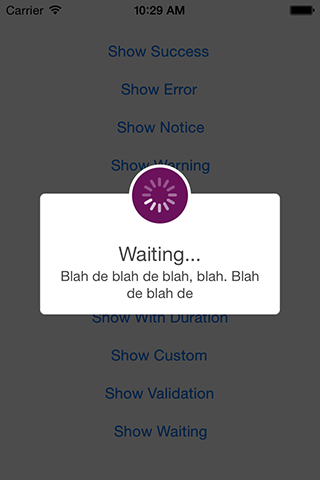
[alert showWaiting:self title:@"Waiting..." subTitle:@"Blah de blah de blah, blah. Blah de blah de" closeButtonTitle:nil duration:5.0f];
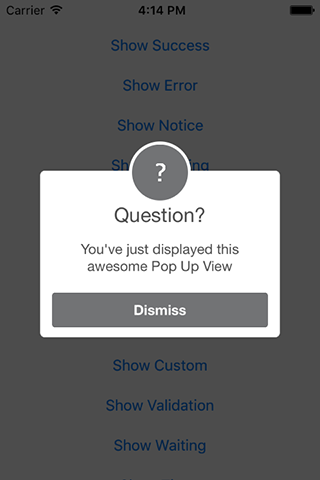
[alert showQuestion:self title:@"Question?" subTitle:kSubtitle closeButtonTitle:@"Dismiss" duration:0.0f];


// Using custom alert width
SCLAlertView *alert = [[SCLAlertView alloc] initWithWindowWidth:300.0f];
SCLAlertview in a new window. (No UIViewController)
SCLAlertView *alert = [[SCLAlertView alloc] initWithNewWindow];

[alert showSuccess:@"Hello World" subTitle:@"This is a more descriptive text." closeButtonTitle:@"Done" duration:0.0f];

// Alternative alert types
[alert showError:@"Hello Error" subTitle:@"This is a more descriptive error text." closeButtonTitle:@"OK" duration:0.0f]; // Error
[alert showNotice:@"Hello Notice" subTitle:@"This is a more descriptive notice text." closeButtonTitle:@"Done" duration:0.0f]; // Notice
[alert showWarning:@"Hello Warning" subTitle:@"This is a more descriptive warning text." closeButtonTitle:@"Done" duration:0.0f]; // Warning
[alert showInfo:@"Hello Info" subTitle:@"This is a more descriptive info text." closeButtonTitle:@"Done" duration:0.0f]; // Info
[alert showEdit:@"Hello Edit" subTitle:@"This is a more descriptive info text with a edit textbox" closeButtonTitle:@"Done" duration:0.0f]; // Edit
[alert showCustom:[UIImage imageNamed:@"git"] color:color title:@"Custom" subTitle:@"Add a custom icon and color for your own type of alert!" closeButtonTitle:@"OK" duration:0.0f]; // Custom
[alert showWaiting:@"Waiting..." subTitle:@"Blah de blah de blah, blah. Blah de blah de" closeButtonTitle:nil duration:5.0f];
[alert showQuestion:@"Question?" subTitle:kSubtitle closeButtonTitle:@"Dismiss" duration:0.0f];

// Using custom alert width
SCLAlertView *alert = [[SCLAlertView alloc] initWithNewWindowWidth:300.0f];
Add buttons
SCLAlertView *alert = [[SCLAlertView alloc] init];

//Using Selector
[alert addButton:@"First Button" target:self selector:@selector(firstButton)];

//Using Block
[alert addButton:@"Second Button" actionBlock:^(void) {
    NSLog(@"Second button tapped");
}];

//Using Blocks With Validation
[alert addButton:@"Validate" validationBlock:^BOOL {
    BOOL passedValidation = ....
    return passedValidation;

} actionBlock:^{
    // handle successful validation here
}];

[alert showSuccess:self title:@"Button View" subTitle:@"This alert view has buttons" closeButtonTitle:@"Done" duration:0.0f];
Add button timer
//The index of the button to add the timer display to.
[alert addTimerToButtonIndex:0 reverse:NO];
Example:
SCLAlertView *alert = [[SCLAlertView alloc] init];
[alert addTimerToButtonIndex:0 reverse:YES];
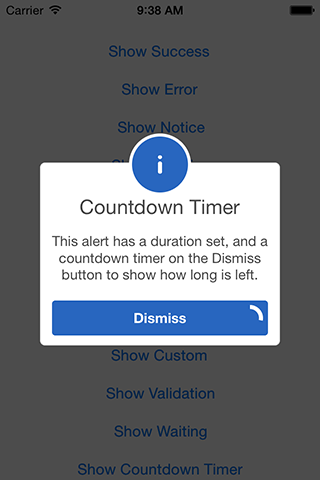
[alert showInfo:self title:@"Countdown Timer" subTitle:@"This alert has a duration set, and a countdown timer on the Dismiss button to show how long is left." closeButtonTitle:@"Dismiss" duration:10.0f];
Add Text Attributes
SCLAlertView *alert = [[SCLAlertView alloc] init];

alert.attributedFormatBlock = ^NSAttributedString* (NSString *value)
{
    NSMutableAttributedString *subTitle = [[NSMutableAttributedString alloc]initWithString:value];

    NSRange redRange = [value rangeOfString:@"Attributed" options:NSCaseInsensitiveSearch];
    [subTitle addAttribute:NSForegroundColorAttributeName value:[UIColor redColor] range:redRange];

    NSRange greenRange = [value rangeOfString:@"successfully" options:NSCaseInsensitiveSearch];
    [subTitle addAttribute:NSForegroundColorAttributeName value:[UIColor greenColor] range:greenRange];

    NSRange underline = [value rangeOfString:@"completed" options:NSCaseInsensitiveSearch];
    [subTitle addAttributes:@{NSUnderlineStyleAttributeName:@(NSUnderlineStyleSingle)} range:underline];

    return subTitle;
};

[alert showSuccess:self title:@"Button View" subTitle:@"Attributed string operation successfully completed." closeButtonTitle:@"Done" duration:0.0f];
Add a text field
SCLAlertView *alert = [[SCLAlertView alloc] init];

UITextField *textField = [alert addTextField:@"Enter your name" setDefaultText:nil];

[alert addButton:@"Show Name" actionBlock:^(void) {
    NSLog(@"Text value: %@", textField.text);
}];

[alert showEdit:self title:@"Edit View" subTitle:@"This alert view shows a text box" closeButtonTitle:@"Done" duration:0.0f];
Indeterminate progress
SCLAlertView *alert = [[SCLAlertView alloc] init];

[alert showWaiting:self title:@"Waiting..." subTitle:@"Blah de blah de blah, blah. Blah de blah de" closeButtonTitle:nil duration:5.0f];
Add a switch button
SCLAlertView *alert = [[SCLAlertView alloc] init];

SCLSwitchView *switchView = [alert addSwitchViewWithLabel:@"Don't show again".uppercaseString];
switchView.tintColor = [UIColor brownColor];

[alert addButton:@"Done" actionBlock:^(void) {
    NSLog(@"Show again? %@", switchView.isSelected ? @"-No": @"-Yes");
}];

[alert showCustom:self image:[UIImage imageNamed:@"switch"] color:[UIColor brownColor] title:kInfoTitle subTitle:kSubtitle closeButtonTitle:nil duration:0.0f];
Add custom view
SCLAlertView *alert = [[SCLAlertView alloc] init];

UIView *customView = [[UIView alloc] initWithFrame:CGRectMake(0.0f, 0.0f, 215.0f, 80.0f)];
customView.backgroundColor = [UIColor redColor];

[alert addCustomView:customView];

[alert showNotice:self title:@"Title" subTitle:@"This alert view shows a custom view" closeButtonTitle:@"Done" duration:0.0f];
SCLAlertView properties
//Dismiss on tap outside (Default is NO)
alert.shouldDismissOnTapOutside = YES;

//Hide animation type (Default is SCLAlertViewHideAnimationFadeOut)
alert.hideAnimationType = SCLAlertViewHideAnimationSlideOutToBottom;

//Show animation type (Default is SCLAlertViewShowAnimationSlideInFromTop)
alert.showAnimationType =  SCLAlertViewShowAnimationSlideInFromLeft;

//Set background type (Default is SCLAlertViewBackgroundShadow)
alert.backgroundType = SCLAlertViewBackgroundBlur;

//Overwrite SCLAlertView (Buttons, top circle and borders) colors
alert.customViewColor = [UIColor purpleColor];

//Set custom tint color for icon image.
alert.iconTintColor = [UIColor purpleColor];

//Override top circle tint color with background color
alert.tintTopCircle = NO;

//Set custom corner radius for SCLAlertView
alert.cornerRadius = 13.0f;

//Overwrite SCLAlertView background color
alert.backgroundViewColor = [UIColor cyanColor];

//Returns if the alert is visible or not.
alert.isVisible;

//Make the top circle icon larger
alert.useLargerIcon = YES;

//Using sound
alert.soundURL = [NSURL fileURLWithPath:[NSString stringWithFormat:@"%@/right_answer.mp3", [[NSBundle mainBundle] resourcePath]]];
Helpers
//Receiving information that SCLAlertView is dismissed
[alert alertIsDismissed:^{
    NSLog(@"SCLAlertView dismissed!");
}];
Alert View Styles
typedef NS_ENUM(NSInteger, SCLAlertViewStyle)
{
    SCLAlertViewStyleSuccess,
    SCLAlertViewStyleError,
    SCLAlertViewStyleNotice,
    SCLAlertViewStyleWarning,
    SCLAlertViewStyleInfo,
    SCLAlertViewStyleEdit,
    SCLAlertViewStyleWaiting,
    SCLAlertViewStyleQuestion,
    SCLAlertViewStyleCustom
};
Alert View hide animation styles
typedef NS_ENUM(NSInteger, SCLAlertViewHideAnimation)
{
    SCLAlertViewHideAnimationFadeOut,
    SCLAlertViewHideAnimationSlideOutToBottom,
    SCLAlertViewHideAnimationSlideOutToTop,
    SCLAlertViewHideAnimationSlideOutToLeft,
    SCLAlertViewHideAnimationSlideOutToRight,
    SCLAlertViewHideAnimationSlideOutToCenter,
    SCLAlertViewHideAnimationSlideOutFromCenter,
    SCLAlertViewHideAnimationSimplyDisappear
};
Alert View show animation styles
typedef NS_ENUM(NSInteger, SCLAlertViewShowAnimation)
{
    SCLAlertViewShowAnimationFadeIn,
    SCLAlertViewShowAnimationSlideInFromBottom,
    SCLAlertViewShowAnimationSlideInFromTop,
    SCLAlertViewShowAnimationSlideInFromLeft,
    SCLAlertViewShowAnimationSlideInFromRight,
    SCLAlertViewShowAnimationSlideInFromCenter,
    SCLAlertViewShowAnimationSlideInToCenter,
    SCLAlertViewShowAnimationSimplyAppear
};
Alert View background styles
typedef NS_ENUM(NSInteger, SCLAlertViewBackground)
{
    SCLAlertViewBackgroundShadow,
    SCLAlertViewBackgroundBlur,
    SCLAlertViewBackgroundTransparent
};
Installation
SCLAlertView-Objective-C is available through :
CocoaPods
To install add the following line to your Podfile:
pod 'SCLAlertView-Objective-C'
Carthage
github "dogo/SCLAlertView"
Collaboration
I tried to build an easy to use API, while beeing flexible enough for multiple variations, but I'm sure there are ways of improving and adding more features, so feel free to collaborate with ideas, issues and/or pull requests.
Incoming improvements
- More animations
- Performance tests
- Remove some hardcode values
Plugin integrations
- nativescript-fancyalert for NativeScript
- Use SCLAlertView with NativeScript
Thanks to the original team
- Design @SherzodMx Sherzod Max
- Development @hackua Viktor Radchenko
- Improvements by @bih Bilawal Hameed, @rizjoj Riz Joj
Related repositories