jeantimex/ios-swift-collapsible-table-section
Swift:iphone: A simple iOS Swift project demonstrates how to implement collapsible table section.
How to Implement Collapsible Table Section in iOS


A simple iOS swift project demonstrates how to implement collapsible table section programmatically, that is no main storyboard, no XIB, no need to register nib, just pure Swift!
In this project, the table view automatically resizes the height of the rows to fit the content in each cell, and the custom cell is also implemented programmatically.
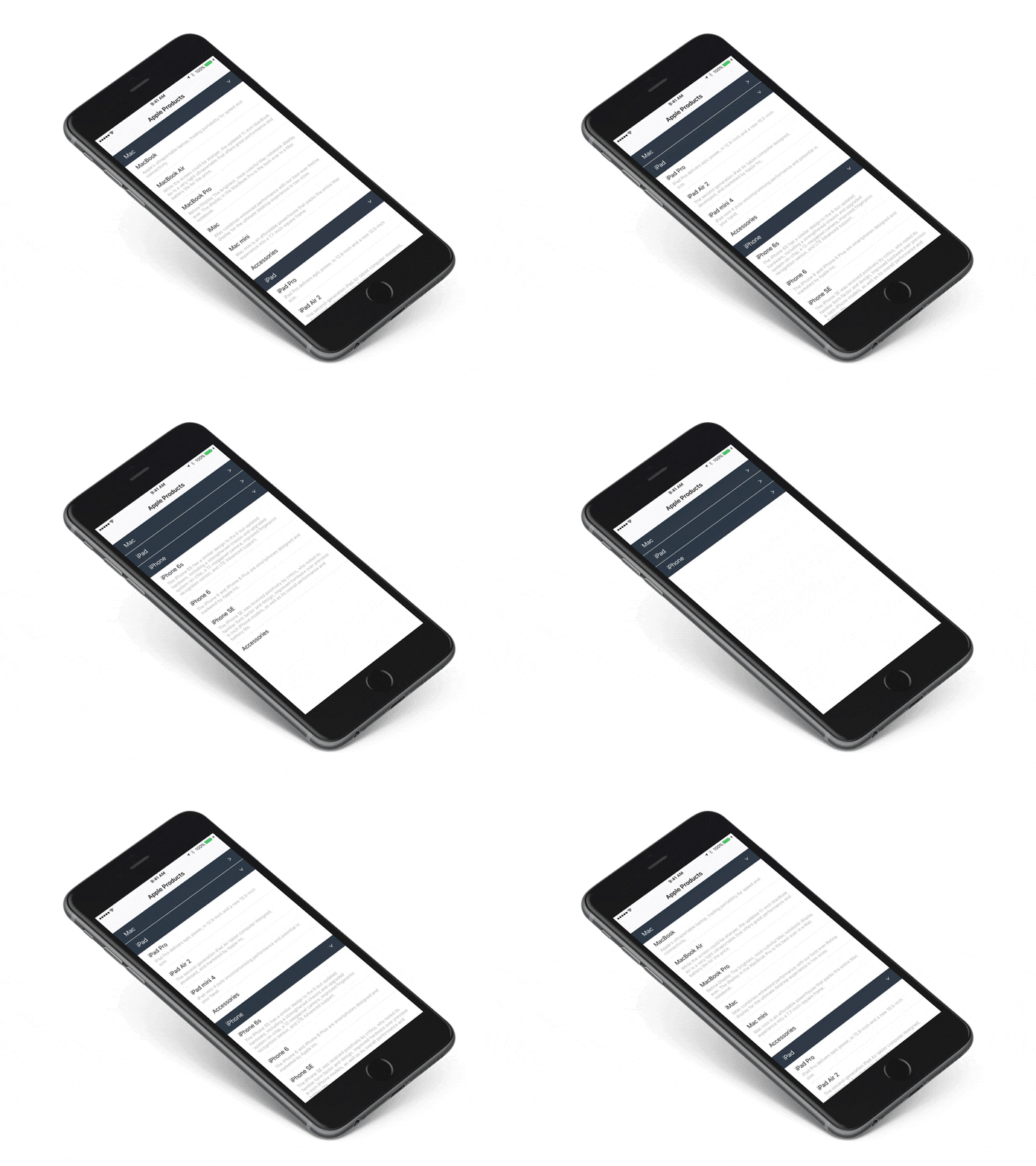
How to implement collapsible table sections?
Step 1. Prepare the Data
Let's say we have the following data that is grouped into different sections, each section is represented by a Section object:
struct Section {
  var name: String
  var items: [String]
  var collapsed: Bool

  init(name: String, items: [Item], collapsed: Bool = false) {
    self.name = name
    self.items = items
    self.collapsed = collapsed
  }
}

var sections = [Section]()

sections = [
  Section(name: "Mac", items: ["MacBook", "MacBook Air"]),
  Section(name: "iPad", items: ["iPad Pro", "iPad Air 2"]),
  Section(name: "iPhone", items: ["iPhone 7", "iPhone 6"])
]
collapsed indicates whether the current section is collapsed or not, by default is false.
Step 2. Setup TableView to Support Autosizing
override func viewDidLoad() {
  super.viewDidLoad()

  // Auto resizing the height of the cell
  tableView.estimatedRowHeight = 44.0
  tableView.rowHeight = UITableViewAutomaticDimension

  ...
}

override func tableView(_ tableView: UITableView, heightForRowAtIndexPath indexPath: NSIndexPath) -> CGFloat {
  return UITableViewAutomaticDimension
}
Step 3. The Section Header
According to Apple API reference, we should use UITableViewHeaderFooterView. Let's subclass it and implement the section header CollapsibleTableViewHeader:
class CollapsibleTableViewHeader: UITableViewHeaderFooterView {
    let titleLabel = UILabel()
    let arrowLabel = UILabel()

    override init(reuseIdentifier: String?) {
        super.init(reuseIdentifier: reuseIdentifier)

        contentView.addSubview(titleLabel)
        contentView.addSubview(arrowLabel)
    }

    required init?(coder aDecoder: NSCoder) {
        fatalError("init(coder:) has not been implemented")
    }
}
We need to collapse or expand the section when user taps on the header, to achieve this, let's borrow UITapGestureRecognizer. Also we need to delegate this event to the table view to update the collapsed property.
protocol CollapsibleTableViewHeaderDelegate {
    func toggleSection(_ header: CollapsibleTableViewHeader, section: Int)
}

class CollapsibleTableViewHeader: UITableViewHeaderFooterView {
    var delegate: CollapsibleTableViewHeaderDelegate?
    var section: Int = 0
    ...
    override init(reuseIdentifier: String?) {
        super.init(reuseIdentifier: reuseIdentifier)
        ...
        addGestureRecognizer(UITapGestureRecognizer(target: self, action: #selector(CollapsibleTableViewHeader.tapHeader(_:))))
    }
    ...
    func tapHeader(_ gestureRecognizer: UITapGestureRecognizer) {
        guard let cell = gestureRecognizer.view as? CollapsibleTableViewHeader else {
            return
        }
        delegate?.toggleSection(self, section: cell.section)
    }

    func setCollapsed(_ collapsed: Bool) {
        // Animate the arrow rotation (see Extensions.swf)
        arrowLabel.rotate(collapsed ? 0.0 : .pi / 2)
    }
}
Since we are not using any storyboard or XIB, how to do auto layout programmatically? The answer is constraint anchors.
override init(reuseIdentifier: String?) {
  ...
  // Content View
  contentView.backgroundColor = UIColor(hex: 0x2E3944)

  let marginGuide = contentView.layoutMarginsGuide

  // Arrow label
  contentView.addSubview(arrowLabel)
  arrowLabel.textColor = UIColor.white
  arrowLabel.translatesAutoresizingMaskIntoConstraints = false
  arrowLabel.widthAnchor.constraint(equalToConstant: 12).isActive = true
  arrowLabel.topAnchor.constraint(equalTo: marginGuide.topAnchor).isActive = true
  arrowLabel.trailingAnchor.constraint(equalTo: marginGuide.trailingAnchor).isActive = true
  arrowLabel.bottomAnchor.constraint(equalTo: marginGuide.bottomAnchor).isActive = true

  // Title label
  contentView.addSubview(titleLabel)
  titleLabel.textColor = UIColor.white
  titleLabel.translatesAutoresizingMaskIntoConstraints = false
  titleLabel.topAnchor.constraint(equalTo: marginGuide.topAnchor).isActive = true
  titleLabel.trailingAnchor.constraint(equalTo: marginGuide.trailingAnchor).isActive = true
  titleLabel.bottomAnchor.constraint(equalTo: marginGuide.bottomAnchor).isActive = true
  titleLabel.leadingAnchor.constraint(equalTo: marginGuide.leadingAnchor).isActive = true
}
Step 4. The UITableView DataSource and Delegate
Now we implemented the header view, let's get back to the table view controller.
The number of sections is sections.count:
override func numberOfSectionsInTableView(in tableView: UITableView) -> Int {
  return sections.count
}
Here is the key ingredient of implementing the collapsible table section, if the section is collapsed, then that section should not have any row:
override func tableView(_ tableView: UITableView, numberOfRowsInSection section: Int) -> Int {
    return sections[section].collapsed ? 0 : sections[section].items.count
}
Noticed that we don't need to render any cell for the collapsed section, this can improve the performance a lot if there are tons of cells in that section.
Next, we use tableView's viewForHeaderInSection function to hook up our custom header:
override func tableView(_ tableView: UITableView, viewForHeaderInSection section: Int) -> UIView? {
    let header = tableView.dequeueReusableHeaderFooterViewWithIdentifier("header") as? CollapsibleTableViewHeader ?? CollapsibleTableViewHeader(reuseIdentifier: "header")

    header.titleLabel.text = sections[section].name
    header.arrowLabel.text = ">"
    header.setCollapsed(sections[section].collapsed)

    header.section = section
    header.delegate = self

    return header
}
Setup the normal row cell is pretty straightforward:
override func tableView(_ tableView: UITableView, cellForRowAtIndexPath indexPath: NSIndexPath) -> UITableViewCell {
  let cell = tableView.dequeueReusableCell(withIdentifier: "Cell") as UITableViewCell? ?? UITableViewCell(style: .default, reuseIdentifier: "Cell")
  cell.textLabel?.text = sections[indexPath.section].items[indexPath.row]
  return cell
}
In the above code, we use the plain UITableViewCell, if you would like to see how to make a autosizing cell, please take a look at our CollapsibleTableViewCell in the source code. The CollapsibleTableViewCell is a subclass of UITableViewCell that adds the name and detail labels, and the most important thing is that it supports autosizing feature, the key is to setup the autolayout constrains properly, make sure the subviews are proplery stretched to the top and bottom in the contentView.
Step 5. How to Toggle Collapse and Expand
The idea is pretty starightforward, reverse the collapsed flag for the section and tell the tableView to reload that section:
extension CollapsibleTableViewController: CollapsibleTableViewHeaderDelegate {
  func toggleSection(_ header: CollapsibleTableViewHeader, section: Int) {
    let collapsed = !sections[section].collapsed

    // Toggle collapse
    sections[section].collapsed = collapsed
    header.setCollapsed(collapsed)

    // Reload the whole section
    tableView.reloadSections(NSIndexSet(index: section) as IndexSet, with: .automatic)
  }
}
After the sections get reloaded, the number of cells in that section will be recalculated and redrawn.
That's it, we have implemented the collapsible table section! Please refer to the source code and see the detailed implementation.
More Collapsible Demo
Sometimes you might want to implement the collapsible cells in a grouped-style table, I have a separate demo at https://github.com/jeantimex/ios-swift-collapsible-table-section-in-grouped-section. The implementation is pretty much the same but slightly different.
Can I use it as a pod?
:tada: Yes! The CocoaPod is finally released, see CollapsibleTableSectionViewController.
Support

Contributors
This project exists thanks to all the people who contribute. [Contribute].
Backers
Thank you to all our backers! 🙏 [Become a backer]

Sponsors
Support this project by becoming a sponsor. Your logo will show up here with a link to your website. [Become a sponsor]
License
MIT License
Copyright (c) 2019 Yong Su @jeantimex
Permission is hereby granted, free of charge, to any person obtaining a copy of this software and associated documentation files (the "Software"), to deal in the Software without restriction, including without limitation the rights to use, copy, modify, merge, publish, distribute, sublicense, and/or sell copies of the Software, and to permit persons to whom the Software is furnished to do so, subject to the following conditions:
The above copyright notice and this permission notice shall be included in all copies or substantial portions of the Software.
THE SOFTWARE IS PROVIDED "AS IS", WITHOUT WARRANTY OF ANY KIND, EXPRESS OR IMPLIED, INCLUDING BUT NOT LIMITED TO THE WARRANTIES OF MERCHANTABILITY, FITNESS FOR A PARTICULAR PURPOSE AND NONINFRINGEMENT. IN NO EVENT SHALL THE AUTHORS OR COPYRIGHT HOLDERS BE LIABLE FOR ANY CLAIM, DAMAGES OR OTHER LIABILITY, WHETHER IN AN ACTION OF CONTRACT, TORT OR OTHERWISE, ARISING FROM, OUT OF OR IN CONNECTION WITH THE SOFTWARE OR THE USE OR OTHER DEALINGS IN THE SOFTWARE.