migueravila/SimpleFox
CSS🦊 A Userstyle theme for Firefox minimalist and Keyboard centered.
npm install simplefox

👇 Index
💫 Features
- Supports Firefox Proton UI
- As simple as you want: All code is commented!
- Variables for custom colors: Customization
- Keyboard Centered Design! Here you can read about the shortcuts: Usage
⚙️ Installation
- In the searchbar type
about:config. A dialog will be shown to you. Press the I accept the risk button. - Search for
toolkit.legacyUserProfileCustomizations.stylesheets,layers.acceleration.force-enabled,gfx.webrender.all, andsvg.context-properties.content.enabled. Change them to True - Go to your Firefox profile:
- If you're on Linux:
$HOME/.mozilla/firefox/XXXXXXX.default-release/ - If you're on Windows:
C:\Users\<USERNAME>\AppData\Roaming\Mozilla\Firefox\Profiles\XXXXXXX.default-XXXXXX - If you're on MacOS:
Users/<USERNAME>/Library/Application Support/Firefox/Profiles/XXXXXXX.default-XXXXXXX
- If you're on Linux:
- Move the
chromefolder into the directory. - Make all the customizations you want here.
- Enjoy!
🚀 Usage
This userstyle was made for a keyboard centered usage, like Tilling Window Manager users or just cool people that loves them! Use the following for a better experience:
AltYou can access to the global menu for an extended options you needAlt + Left ArrowYou can go BackAlt + Right ArrowYou can go ForwardCtrl + Lfocuses the NavbarCtrl + Bshows you the BookmarksCtrl + Hshows you the History BarCtrl + TOpens a new TabCtrl + WCloses a TabCtrl + Shift + TRe-opens a tab that you just closedCtrl + RRefresh the page you're onCtrl + Shift + AQuick open for Add-Ons
🎨 Customization
All the configuration will be managed in the userChrome.css file. And also all the code is commented so you can easily change values and colors as you like.
💛 Colors
In this section of the code you can change the colors, there's a window color and a tabs / urlbar color.
:root {
  --sfwindow: #19171a;
  --sfsecondary: #201e21;
}
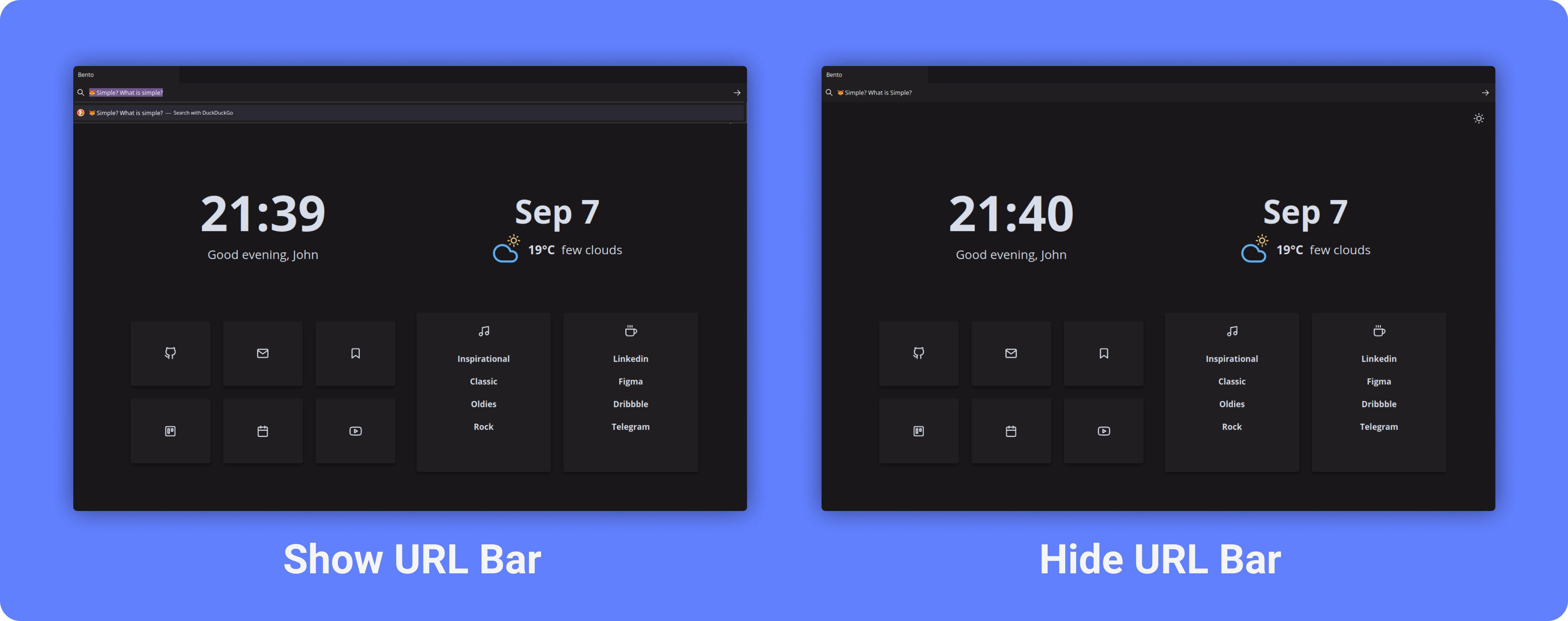
🚧 URL Bar

You can show and hide the URL Bar (See the difference above) by commenting / uncomment the following section of code:
/*─────────────────────────────*/
/* Comment this section if you */
/* want to show the URL Bar    */
/*─────────────────────────────*/

.urlbarView {
  display: none !important;
}

/*─────────────────────────────*/
🔧 Recommended settings
- Right click on toolbar -> Customize.
- Remove (as you want) all the removable elements including extensions, drag space and buttons.
- Install the SimpleFox add on theme.
🍱 Startpage
If anyone has the doubt, in almost all of the screenshots you can see a Startpage made for it. It's called Bento 🍱 and It's another project I made. It fits with the Firefox theme because It's done with the same principles: Minimalist, Simple and Elegant.

⛲ One line version: Cascade
Andreas Grafen has made an awesome work making a One Line theme inspired by SimpleFox. As it's work is awesome and allows you customization I can totally recomend it. Here you can find his repo: Link

⚠️ Notes
- As Firefox changed at version 88 introducing the Proton UI, all the old files and configurations moved to oldFirefox branch.
- Windows and MacOS are currently tested but may not be in the future.
- Some custom themes (And GTK themes in Linux) may break context menus.